
What Googlebook OS is, and how it differs from ChromeOS and Windows
Google's new laptop platform pairs Android's foundations with ChromeOS's desktop pieces, and early reviews say the software still trails the hardware.
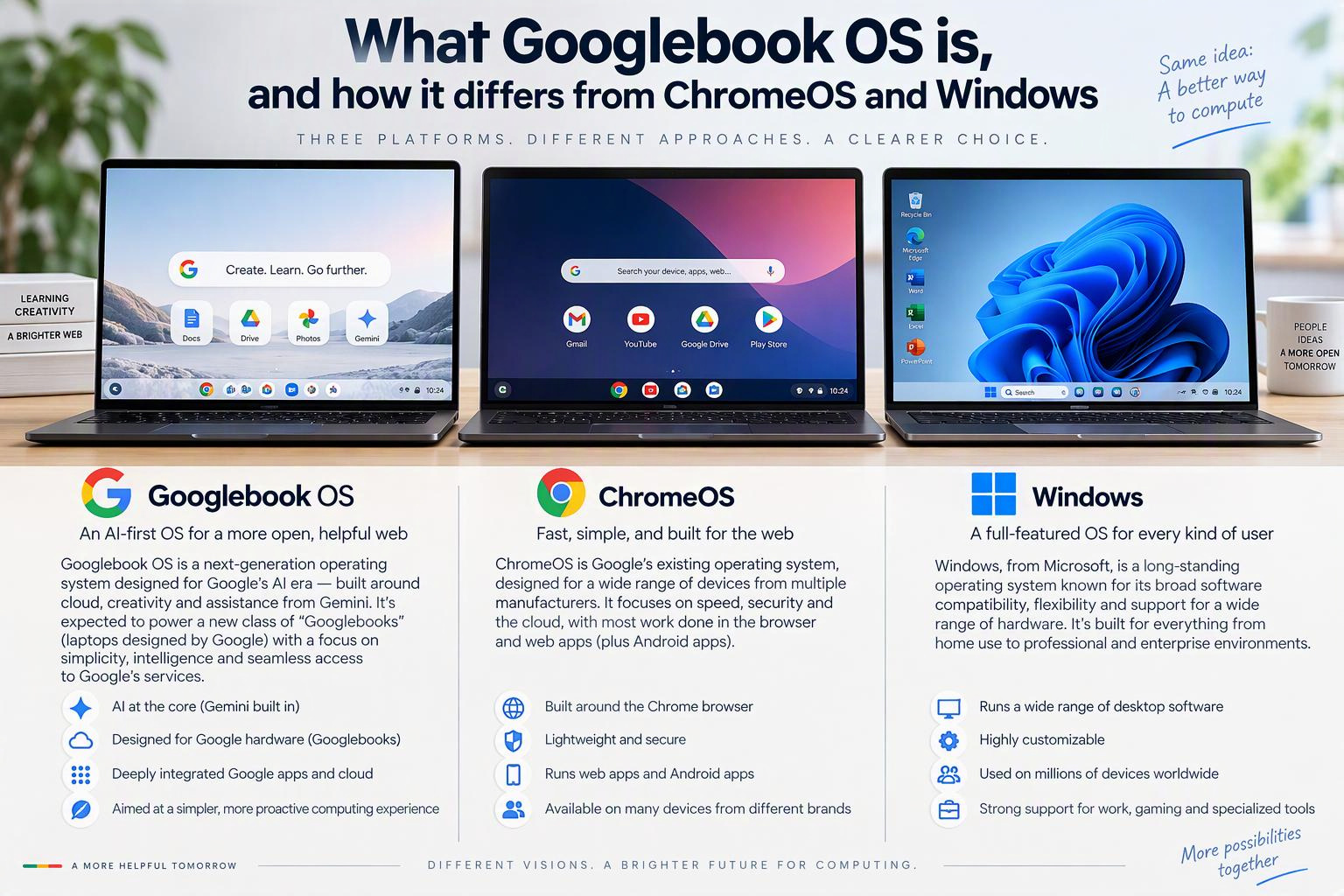
Googlebook OS is Google's Android-based laptop operating system, on sale in the U.S. since October 4, 2026, on premium laptops starting at $899. It differs from ChromeOS in its app support, price tier and phone integration, and it cannot run Windows desktop software. Early reviews, including Engadget's verdict on the Dell XPS Googlebook, find the platform unfinished.
Googlebook OS is Google's new laptop operating system. According to Google, it is built on the Android technology stack and paired with desktop foundations from ChromeOS. It reached U.S. buyers on October 4, 2026, on a small set of premium laptops with prices starting at $899, well above the typical Chromebook.
The platform matters because it sits at an awkward junction. Chromebook owners want to know whether their machines have a future, and shoppers weighing a premium Windows laptop want to know whether a Google-made alternative is ready. Engadget's review of the Dell XPS Googlebook this week brought the question into focus: the outlet praised the hardware, titled the review "Beautiful hardware for a useless platform," and gave it 6.5 out of 10.
The evidence base is thin and young. Almost everything published so far comes from Google's own statements and hands-on reviews by tech journalists, with no independent benchmarks, sales figures or peer-reviewed work. This article separates what Google says, what reviewers found, and what remains unsettled.
What Googlebook OS actually is
Coverage often blurs two terms. Googlebook is the category of laptops, a standard that hardware makers build to. Googlebook OS is the operating system those laptops run. Some older or low-quality pages still use the codename Aluminium OS, which Google has dropped.
Google's Chrome Enterprise help page describes Googlebook OS as a new operating system that brings together the best of ChromeOS and the Android technology stack. XDA-Developers gives a more specific technical picture: the Android stack running on a native Linux kernel, alongside ChromeOS's desktop foundations, with Gemini Intelligence layered on top. TechRepublic's comparison table instead calls it "ChromeOS with deeper Android integration," a framing that differs from Google's own. Google's description is the more defensible one, since it comes from the maker.
The rollout was staged. According to 9to5Google, the category was previewed at The Android Show on May 12, 2026. XDA reports that pre-orders opened September 21 and that the U.S. release followed on October 4.
The hardware tier
Google positions Googlebooks as a new line of premium laptops designed to sync with an Android phone, starting at $899. They have metal chassis and chips from Intel, Qualcomm and MediaTek. According to 9to5Google's launch coverage, Google's baseline is 16 GB of RAM, with 32 GB variants available, and every model has a touchscreen.
Engadget points out that hardware makers face no rigorous spec requirements, though all five launch models clear the 16 GB floor. Its hands-on report on the Dell XPS Googlebook lists a 13.4-inch display, a thickness of 12.7 mm, a Qualcomm Snapdragon X Elite chip, 16 GB of RAM and 512 GB of storage. Google rates battery life across the launch models at up to 14 hours of video playback or 16 hours of web browsing. Those are manufacturer ratings, not measurements, and no independent battery tests have been published.
Interface and phone integration
9to5Google's Abner Li found the interface Android-like. Quick Settings and notifications sit in the top-right corner, matching Android's conventions, while the reliance on web apps reflects the system's ChromeOS lineage. He described the Android-style design as immediately natural.
The phone connection is the platform's main pitch. 9to5Google lists Cast My Apps, which streams a phone's apps into a desktop window where they can be used; Android 17's Continue On feature; and a Files app that shows files stored on the phone. Techlicious cautioned at the May announcement that no one outside Google could verify how this fluid cross-device behavior would work in practice. That caution predates the launch, and it is not a finding about the shipped product.
Gemini as the organizing feature
Google's blog presents Gemini as built into the system. The headline feature is Magic Pointer: wiggle the cursor and Gemini engages with whatever is on screen. Others include Rambler voice dictation, Create My Widget and Antigravity. Engadget's reviewer singled out Rambler dictation as one of the XPS Googlebook's strengths.
Google also says every purchase includes a 12-month subscription to advanced AI tools and cloud storage. The plan's name and terms were not visible in the material reviewed for this article, and neither were Google's privacy claims for Magic Pointer, so both remain unchecked.
How it differs from ChromeOS
Apps: emulated versus native
The clearest technical difference involves Android apps. Engadget explains that ChromeOS runs them through emulation, which produces occasional poor performance and bugs. Googlebooks, by contrast, have access to the full Google Play Store. XDA adds that Google plans to curate and test apps optimized for desktop use.
Access is not the same as quality, though. 9to5Google's separate commentary calls apps the platform's biggest problem and says many are a shell of their Windows and macOS counterparts. Chrome Unboxed, by contrast, reports that Adobe Photoshop, Lightroom and CapCut run natively. That report comes from a page with a retailer link that reads like launch marketing. Both statements can be true at once, since an app being present does not make it feature-equivalent, but no app-by-app audit exists to settle it.
Price tier and intended use
According to Tom's Guide, Chromebooks have ranged from $150 to over $600. Googlebooks start at $899, so they compete in a different bracket. Engadget's explainer says a Googlebook is a better option than a Chromebook for someone who needs a laptop for video editing and casual games, which reflects the higher hardware floor.
Linux and Windows-app routes
ChromeOS offered a Linux environment and, for enterprises, a paid route to Windows apps. Computerworld described ChromeOS Virtual App Delivery, which relies on Cameyo's technology. Googlebook OS has not carried either over intact. 9to5Google's HP Googlebook 14 review says Linux support has regressed tremendously, while another 9to5Google headline says Linux app support will improve "eventually." No timeline has been given.
What happens to ChromeOS
Sources disagree on whether Googlebook OS replaces ChromeOS. PC World calls it the Android-based laptop operating system that is replacing ChromeOS, and Tom's Hardware headlines a "ChromeOS phase out in 2034." XDA, however, reports that Google emphasized Googlebook and Googlebook OS are not a replacement for Chromebooks and ChromeOS. That is a news report relaying Google, not the primary statement.
The concrete commitments are narrower. Google's help page says many of its newest Chromebooks will be eligible to transition to Googlebook OS. Engadget reports that Chromebooks will keep receiving software updates and security patches through 2034, and Tom's Hardware says Googlebooks will follow the same 10-year update and patch system. TechRepublic notes that eligible models and migration paths will be announced later. The most defensible reading is that ChromeOS continues for now, Googlebook OS is where Google is heading, and the end state is unstated.
How it compares with Windows
The sharpest contrast with Windows is software compatibility. Computerworld quotes a Google statement that the company is not relying on Windows emulation, and reports that the devices will have no manner of Windows app compatibility. TechRepublic advises anyone who relies on specialized Windows applications to check compatibility before buying.
Price is the second point of contact. TechRepublic observes that the $899 floor puts Googlebooks in the territory of premium Windows laptops and MacBooks, not Chromebooks. A buyer at that price has a wide choice, which makes the software trade-offs harder to overlook.
Reviewers have been blunt about capability. 9to5Google's HP review states that Googlebook OS "is not as capable as Windows or macOS," and adds that the laptop would be a much better experience running Windows or even Linux.
Management and business use
Organizations that manage fleets of laptops face a gap. Tom's Hardware reports, citing a Google administrator document, that management capabilities for Googlebooks will arrive in the back half of 2027. That is a single secondary source. Google's own page says only that management will operate under a new licensing structure. Enterprise and education readiness therefore remains an open question.
| Item | Price | Source |
|---|---|---|
| Googlebook starting price (all models) | $899 | Google blog |
| Dell XPS Googlebook, list | $1,199 | Engadget (Sept. 21) |
| Dell XPS Googlebook, Best Buy (initial) | $999 | Engadget (Sept. 21) |
| Lenovo Googlebook 15, starting | $1,299 | 9to5Google |
| Typical Chromebook range | $150 to $600+ | Tom's Guide |
Engadget's review refers to the Dell at roughly $1,000, so the XPS price appears to have been promotional at points. Google's $899 is a floor for the category, not what the reviewed model costs.
What early reviews found
Engadget's Devindra Hardawar scored the Dell XPS Googlebook 6.5 out of 10 at $1,000. He praised the design, light weight, screen, keyboard and Rambler dictation, but concluded that even Dell's excellent design cannot rescue the XPS Googlebook from the problems of Googlebook OS. In one example, the Evernote Android app was unavailable, forcing him to use the website, and his typical workflow often felt like pulling teeth.
Other outlets reached similar conclusions independently. 9to5Google's October 12 platform review described the system as the beginnings of a desktop OS for the Android smartphone generation, but said the strategy reset makes for a rough first take. Android Headlines said Googlebook OS still feels like a beta and that buyers are paying close to a grand to test it for Google.
The reviews are not uniformly negative. 9to5Google argued the new base is a much better foundation for the years ahead, and reviewers consistently praise the hardware. Tom's Guide wrote that a dedicated Android user who wants a higher-end laptop that works seamlessly with a phone could find a Googlebook perfect.
The limits matter. Each outlet had one reviewer and a short testing window; 9to5Google, for example, used its device for just over a week. Verdicts like "useless" and "beta" are opinions, not measured results. Engadget's judgment also rests on one person's workflow built around note-taking and writing apps, and 9to5Google and Chrome Unboxed are enthusiast outlets that cover Google closely. Several other "reviews" in circulation are rewrites of Engadget's and add no independent confirmation.
Who Googlebook OS is for
No buyer data exists yet, so the likely audience is a synthesis of Google's positioning and reviewer commentary. The target is an Android phone owner who wants a premium, AI-forward laptop and spends most of their time in web and Android apps. Google's own pitch, a laptop built to sync with an Android phone, points the same way, as does the Tom's Guide verdict.
Several groups look like poor fits, based on the reporting above:
- Users who depend on specialized Windows applications, since Googlebook OS has no Windows app compatibility.
- Linux-heavy users, given 9to5Google's finding that Linux support has regressed.
- Organizations needing mature device management, which Tom's Hardware reports is not expected until the second half of 2027.
- Budget Chromebook buyers, since the category starts at $899 against a typical Chromebook range of $150 to $600+. 9to5Google's commentary goes further: if a Chromebook was not for you, Googlebook is not either.
A platform still deciding what it will be
Googlebook OS reads less like a finished rival to Windows than like a strategic bet. Google has moved its laptop foundation toward Android, accepted the costs of a reset, and priced the first hardware well above where Chromebooks lived. Whether that proves a failure or a slow start is, for now, unresolved, and the answer depends on app support and software updates that have not yet arrived.
Several signals will show which way it goes: the published list of Chromebooks eligible to migrate, the pace of desktop-optimized app support, any Linux improvements, the arrival of management tools in 2027, and sales data once analysts report on the fourth quarter of 2026. Until then, the hardware has earned praise and the software has not.
Frequently asked questions
What is Googlebook OS?
Googlebook OS is Google's new laptop operating system, which Google says brings together the Android technology stack and desktop foundations from ChromeOS. It launched in the U.S. on October 4, 2026, on premium laptops starting at $899. Gemini AI features are built in.
Is Googlebook OS replacing ChromeOS?
Sources conflict. PC World and Tom's Hardware use language like "replacing" and "phase out," while XDA reports Google saying Googlebook is not a replacement for Chromebooks. Google's admin page says ChromeOS devices keep receiving updates through 2034, and many newer Chromebooks will be eligible to transition.
Can a Googlebook run Windows programs?
No. Computerworld quotes a Google statement that the company is not relying on Windows emulation, and reports that the devices will have no Windows app compatibility. TechRepublic advises anyone who relies on specialized Windows software to check compatibility first.
Can a Googlebook run Android apps?
Yes. According to Engadget, Googlebooks have access to the full Google Play Store, whereas ChromeOS emulates Android apps and sometimes performs poorly. Reviewers say app quality on a desktop is uneven, and Engadget's reviewer could not get the Evernote app.
How much does a Googlebook cost?
Google lists $899 as the starting price. The Dell XPS Googlebook was listed at $1,199, with an initial Best Buy price of $999, according to Engadget, and 9to5Google reports that the Lenovo Googlebook 15 starts at $1,299.
Sources
- What the Googlebook announcement means for your ChromeOS devices , Google (Chrome Enterprise and Education Help)
- Googlebook: The laptop your Android phone has been waiting for , Google
- Googlebook's built-in intelligence reinvents the way you use your laptop , Google
- Dell XPS Googlebook review: Beautiful hardware for a useless platform , Engadget
- I tried every new Googlebook announced today , Engadget (2026-09-21)
- Are Chromebooks still worth buying after the Googlebooks release? , Engadget
- Googlebook OS hands-on: It's Android, stupid , 9to5Google (2026-09-21)
- Google fully details Googlebooks: $899+, October launch, & more , 9to5Google (2026-09-21)
- If a Chromebook wasn't for you, Googlebook isn't either , 9to5Google (2026-10-13)
- HP Googlebook 14 Review: Great laptop, shame about the ... , 9to5Google (2026-10-16)
- Google announces Googlebooks with Gemini Intelligence focus, coming this fall , 9to5Google (2026-05-12)
- The Googlebook is finally here, and aims to blend Android and ChromeOS into one premium laptop operating system , XDA-Developers
- Google confirms ChromeOS phase out in 2034 — 10-year support lifetime cut short for some devices, company says it will support transition to Googlebook OS , Tom's Hardware
- Google re-confirms ChromeOS will get regular updates through mid-2034 , Chrome Unboxed
- Hello, Googlebook: The complete FAQ on Google's Android-ChromeOS combo , Computerworld
- The line-blurring brilliance of Google's new ChromeOS-Windows connection , Computerworld
- ChromeOS vs Googlebook OS: Support, Apps and Upgrades , TechRepublic
- Googlebooks vs Chromebooks — here are the actual differences , Tom's Guide
- Google's new Googlebook OS is basically Android for laptops , PC World
- Dell XPS Googlebook Review: Great Hardware Paying for Google's Beta Test , Android Headlines
- Googlebook is Google's answer to the MacBook. Here's what we know so far. , Techlicious
This article was drafted with the help of AI and reviewed by Jaroha editors before publication.